LaTeX에서 theorem 스타일 설정하는 법
설명
\newtheorem으로 정리 환경을 만들면 기본적으로 제목은 굵게, 본문은 기울임꼴로 출력된다. 그런데 정의나 비고처럼 본문이 기울어지지 않는 편이 읽기 좋은 환경도 있다. amsthm 패키지는 이를 위해 세 가지 미리 정의된 양식을 제공하고, \theoremstyle 명령어로 골라 쓸 수 있다.
\theoremstyle{stylename}
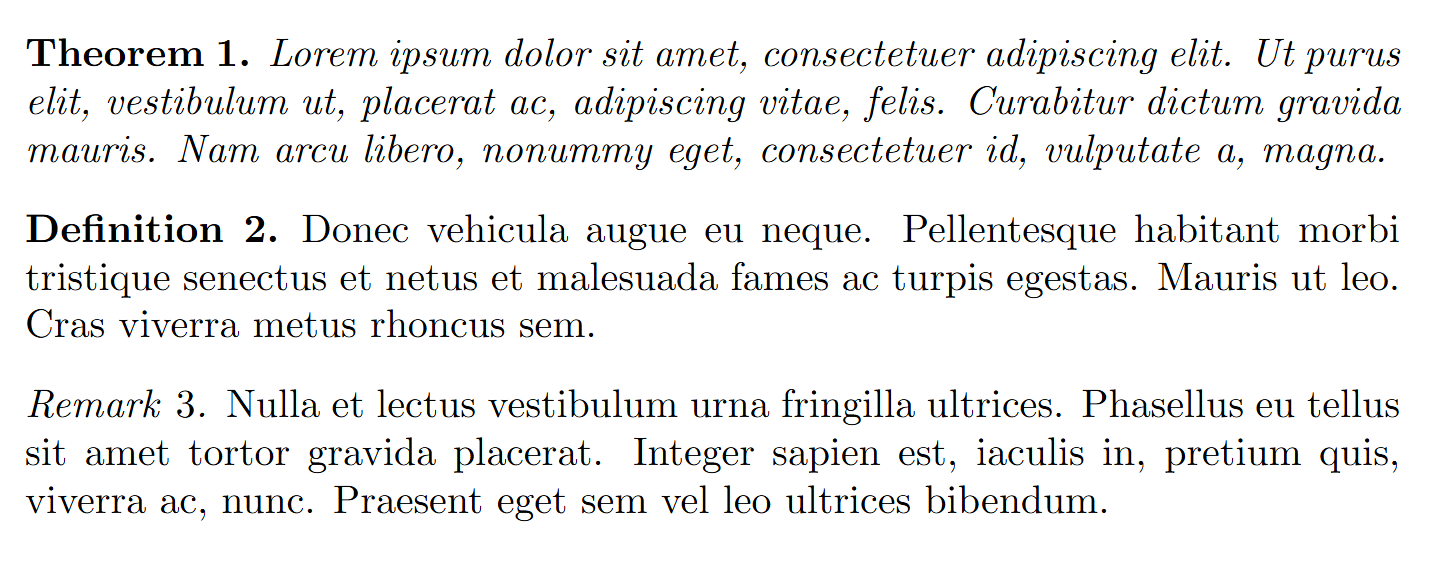
여기서 stylename에는 plain, definition, remark 중 하나가 들어간다. 세 양식의 차이는 다음과 같다.
| 양식 | 제목 | 본문 | 주로 쓰는 환경 |
|---|---|---|---|
plain | 굵게 | 기울임꼴 | 정리, 보조정리, 명제, 따름정리 |
definition | 굵게 | 똑바로(로만) | 정의, 예제, 조건 |
remark | 기울임꼴 | 똑바로(로만) | 비고, 참고, 주석 |
plain은 \newtheorem의 기본값이므로, 양식을 따로 지정하지 않으면 plain이 적용된다.
코드
\theoremstyle은 그 뒤에 오는 \newtheorem 선언들에 적용된다. 따라서 양식을 바꾸고 싶은 환경을 정의하기 전에 미리 선언해 두어야 한다. 한 번 선언하면 다음 \theoremstyle이 나올 때까지 계속 유효하다.
\theoremstyle{plain}
\newtheorem{theorem}{Theorem}
\newtheorem{lemma}[theorem]{Lemma}

\theoremstyle{definition}
\newtheorem{definition}[theorem]{Definition}

\theoremstyle{remark}
\newtheorem{remark}[theorem]{Remark}
이렇게 두면 theorem과 lemma는 plain 양식, definition은 definition 양식, remark는 remark 양식으로 출력된다. 본문에서는 다음과 같이 사용한다.
\begin{theorem}
\lipsum[1][1-4]
\end{theorem}

\begin{definition}
\lipsum[1][5-8]
\end{definition}

\begin{remark}
\lipsum[1][9-12]
\end{remark}
출력 결과는 다음과 같다. theorem의 본문은 기울어지고, definition과 remark의 본문은 똑바로 출력되며, remark의 제목만 기울어진 것을 확인할 수 있다.