
Handling Strings in R
Overview
Although it is less pronounced than in the languages developers frequently use, handling strings comes up more often than you might expect in R as well. The more vast and unruly the data, the more critically important these small techniques become.
Tips
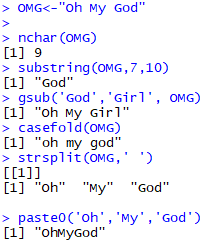
- The
nchar()function simply returns the length of a string. Anyone who came from another language first has almost certainly tried typinglengthfirst. - The
substring()function, as its name easily suggests, is a function that returns a substring. In the example, it returned “God”, the 7th through 10th characters of “Oh My God”. - The
gsub()function is a function that replaces all occurrences of part of a string with another string. Naturally, it is case-sensitive. - The
casefold()function is a function that converts all uppercase letters to lowercase. In statistics or linguistics, case distinction is usually unnecessary, so it can be used conveniently. - The
strsplit()function is a function that splits a given string by some criterion and returns the resulting vector. As you can see, whitespace works too, and you can even enter ’’ to split it into individual characters. - The
paste0()function is a function that joins the given strings without whitespace.
Of course, you could just use options in the paste() function, but the code becomes much more concise and cleaner.
Code
OMG<-"Oh My God"

nchar(OMG)
substring(OMG,7,10)
gsub('God','Girl', OMG)
casefold(OMG)
strsplit(OMG,' ')