
Converting Numbers in Categorical Data to Numeric Data in R
Overview
This is a tip for those who want to convert data that is read as categorical even though it consists of numbers into continuous data, but cannot get it to work as intended. Since most of this post is devoted to explaining the underlying principle, if you only need the conclusion, I recommend reading from the Practical Example below.
For reference, the term Cast is usually used when converting a data type.
Principle
When doing statistical analysis with R, the most important thing, even before any technique, is to understand the data itself.
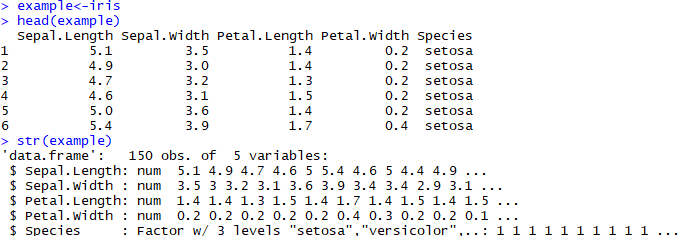
This shows loading the iris data, checking the data, and then checking its str ucture. As shown here, using the str() function briefly explains what form each column of the data is in and gives an example of each. It is not as nicely formatted as head(), but the more variables there are, the more it fits at a glance and lets you grasp the data types, so it is used often. So it seems like str() alone would be all-purpose, but the more vast and complex the data becomes, the more unusual cases arise, and situations come up where you have to check them one by one.
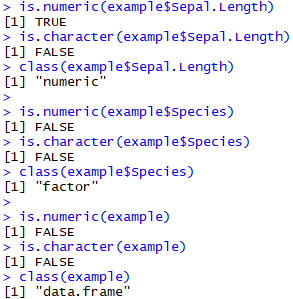
That is why the is.X() functions and the class() function are needed. is.X() returns a boolean indicating whether the given argument is X or not, and if there are multiple arguments, it determines whether they are all X. class() returns as a string what specific data type it is.
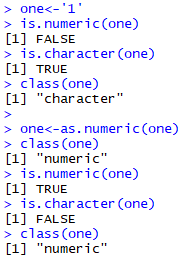
Meanwhile, the as.X() function converts a given argument into X as much as possible. Similarly, it seems like categorical data written as numbers could also be finished off simply by converting it with as.numeric(), but before that, you need to understand categorical data.
Practical Example
Look at the following example:
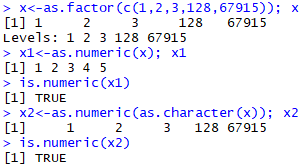
Note that x1 was not converted properly, but x2 was converted exactly as intended. The principle is as follows.
As you can see, categorized data has no meaning as a number and merely belongs to one of the divided classes. Therefore, even if you convert it with as.numeric(), a one-to-one correspondence with the natural numbers takes place based on the fact that it is a category. If you think about it, this approach is the most reasonable in order to also correspond to a category like $\left\{ a, 2, c , \cdots , z_{2} \right\}$.
Therefore, to keep the given numbers as they are, you first need to convert them into strings and then convert them into numbers. When a category made of numbers is converted into strings, it does not particularly correspond to the natural numbers but is brought over as is, so there is no loss of information; and when a string made of numbers is converted into numbers, there is no need to create a new number, so there is no loss of information.
If you understand functions and data types well, you can use various tricks that are useful in data handling. It is a precious weapon that should not be belittled just because it is not directly related to statistics right away.
Code
Below is the example code.
example<-iris
head(example)
str(example)

is.numeric(example$Sepal.Length)
is.character(example$Sepal.Length)
class(example$Sepal.Length)

is.numeric(example$Species)
is.character(example$Species)
class(example$Species)

is.numeric(example)
is.character(example)
class(example)

one<-'1'
is.numeric(one)
is.character(one)
class(one)

one<-as.numeric(one)
class(one)
is.numeric(one)
is.character(one)
class(one)

x<-as.factor(c(1,2,3,128,67915)); x
x1<-as.numeric(x); x1
is.numeric(x1)
x2<-as.numeric(as.character(x)); x2
is.numeric(x2)