How to Set Theorem Styles in LaTeX
Explanation
When you create a theorem environment with \newtheorem, by default the title is printed in bold and the body in italics. However, for some environments such as definitions or remarks, it reads better if the body is not italicized. The amsthm package provides three predefined styles for this purpose, which you can select with the \theoremstyle command.
\theoremstyle{stylename}
Here, stylename takes one of plain, definition, or remark. The differences among the three styles are as follows.
| Style | Title | Body | Typical environments |
|---|---|---|---|
plain | bold | italic | theorem, lemma, proposition, corollary |
definition | bold | upright (roman) | definition, example, condition |
remark | italic | upright (roman) | remark, note, comment |
plain is the default for \newtheorem, so if you do not specify a style, plain is applied.
Code
\theoremstyle applies to the \newtheorem declarations that follow it. Therefore, you must declare it before defining the environment whose style you want to change. Once declared, it remains in effect until the next \theoremstyle appears.
\theoremstyle{plain}
\newtheorem{theorem}{Theorem}
\newtheorem{lemma}[theorem]{Lemma}

\theoremstyle{definition}
\newtheorem{definition}[theorem]{Definition}

\theoremstyle{remark}
\newtheorem{remark}[theorem]{Remark}
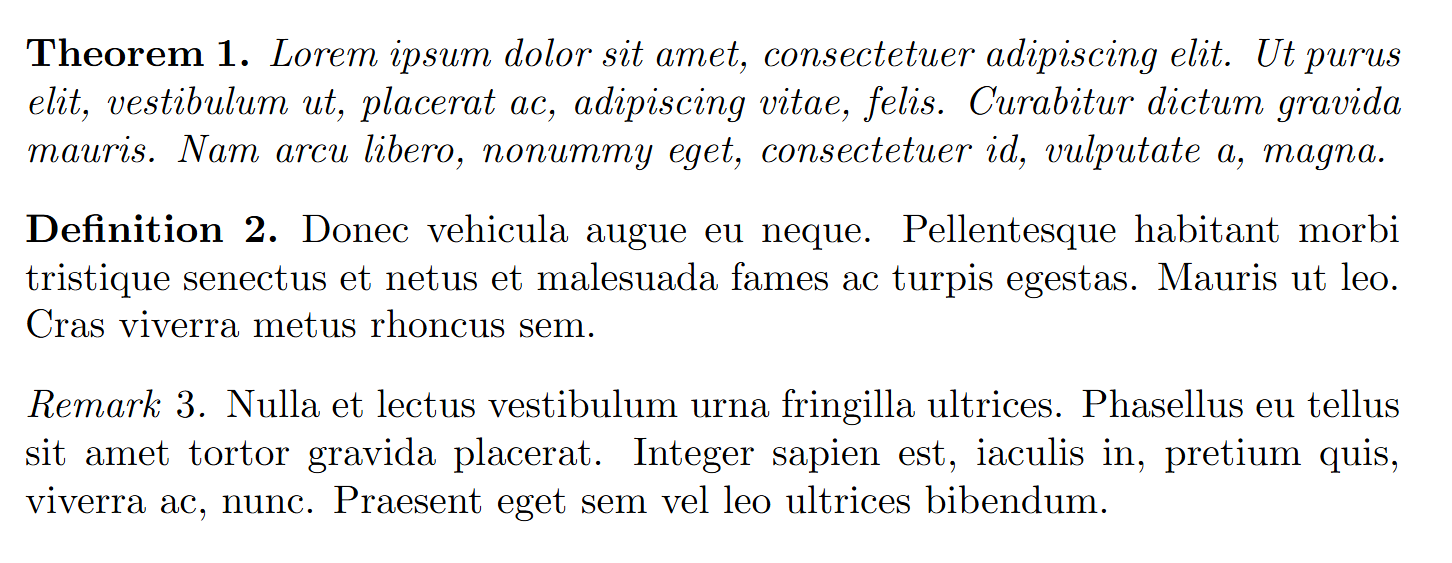
With this setup, theorem and lemma are printed in the plain style, definition in the definition style, and remark in the remark style. In the body, they are used as follows.
\begin{theorem}
\lipsum[1][1-4]
\end{theorem}

\begin{definition}
\lipsum[1][5-8]
\end{definition}

\begin{remark}
\lipsum[1][9-12]
\end{remark}
The output is as follows. You can confirm that the body of theorem is italicized, the bodies of definition and remark are printed upright, and only the title of remark is italicized.